Build an Odoo MCP Server: Connect Your ERP to AI Agents
The Model Context Protocol lets AI agents call tools. Here is how an Odoo MCP server exposes your ERP to Claude and other LLMs, safely, through a proxy.
ODXProxy Team · Jul 5, 2026 · 7 min read
Your Odoo instance is where the real work lives — customers, quotations, invoices, stock moves. The new generation of AI agents (Claude, IDE assistants, chat copilots) is very good at deciding what to do, but it has no hands: it can't read a partner record or confirm a sale order unless you give it a tool to do so. An Odoo MCP server is that tool layer. This guide explains what the Model Context Protocol is, how an Odoo MCP server fits in front of your ERP, and why routing every agent call through a proxy — rather than handing an LLM your Odoo credentials directly — is the pattern you actually want in production.
What MCP is, in one paragraph
The Model Context Protocol (MCP) is an open standard for connecting AI applications to external tools and data. An MCP server advertises a set of tools (each with a name, a description, and a JSON Schema for its inputs); an MCP client — Claude Desktop, an IDE assistant, or your own agent runtime — connects to that server, discovers the tools, and lets the model call them. The wire format is JSON-RPC 2.0, and the transport is typically stdio (for a local process) or streamable HTTP (for a remote server). If you have ever written a function-calling integration by hand, MCP is the standardized, reusable version of that: build the server once, and any MCP-aware client can use it.
That makes MCP a natural fit for Odoo. Instead of teaching every AI product how to speak execute_kw,
you expose a handful of well-described Odoo tools once, and every agent that speaks MCP can read and
write records on your behalf.
The architecture: client → MCP server → proxy → Odoo
An Odoo MCP server sits in the middle of a short chain. Nothing about it talks to Odoo's XML-RPC layer directly; it translates MCP tool calls into ODXProxy's unified JSON-RPC request shape, and the proxy does the talking to Odoo.
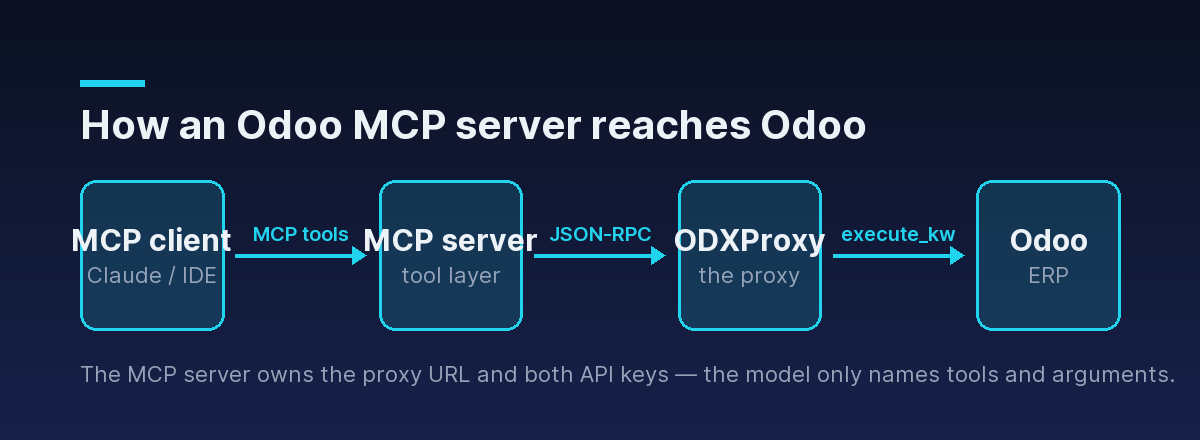
Each hop has one job:
- MCP client — hosts the model, discovers tools, and decides which to call with what arguments.
- MCP server — maps each tool call onto a single ODXProxy action (
search_read,create,call_method, …), holds the proxy URL and keys, and shapes the response back into something the model can read. - ODXProxy — authenticates the request, validates the action against its allowlist, forwards it to the target Odoo instance, and returns a JSON-RPC 2.0 envelope.
- Odoo — runs the actual ORM call.
The odxproxy-mcpserver project is exactly this
middle box: an MCP server that wraps the proxy's actions as MCP tools so an AI agent can operate an
Odoo instance without ever holding raw Odoo credentials.
What the tools look like
ODXProxy exposes nine actions — search_count, search, read, fields_get, search_read,
create, write, unlink, and call_method. An Odoo MCP server maps these onto MCP tools with
descriptions written for a model to read. A search_read tool, for example, might be advertised like
this:
{
  "name": "odoo_search_read",
  "description": "Search Odoo records matching a domain filter and read back selected fields in one round trip. Use this to look up, list, or filter records such as customers, sale orders, or products.",
  "inputSchema": {
    "type": "object",
    "properties": {
      "model": { "type": "string", "description": "Odoo model name, e.g. res.partner" },
      "domain": { "type": "array", "description": "Odoo search domain, e.g. a filter on is_company" },
      "fields": { "type": "array", "items": { "type": "string" } },
      "limit": { "type": "integer" }
    },
    "required": ["model", "domain", "fields"]
  }
}
When the model decides to call odoo_search_read, the MCP server receives those arguments and turns
them into a single ODXProxy request. Under the hood, that call becomes an ordinary
POST /api/odoo/execute with action: "search_read":
{
  "id": "mcp-42",
  "action": "search_read",
  "model_id": "res.partner",
  "params": [[["is_company", "=", true]]],
  "keyword": { "fields": ["name", "email"], "limit": 20 },
  "odoo_instance": {
    "url": "https://erp.example.com",
    "db": "prod",
    "user_id": 2,
    "api_key": "<the Odoo user API key>"
  }
}
Note the two levels of shaping. The MCP server owns the mapping from tool argument (domain) to
wire field (params is a JSON array, so the domain is nested one level: [[domain]]), and it owns
the odoo_instance block entirely — the model never sees or supplies Odoo credentials. That is the
whole point of putting the server in the middle.
For anything that isn't plain CRUD — confirming a sale order, posting an invoice, running a custom
method — the server maps the tool onto call_method with a non-empty fn_name. The mechanics of that
action are covered in calling custom Odoo methods with call_method; an MCP
server is just an automated caller of the same endpoint.
Why a proxy sits between the agent and Odoo
You could let an agent hit Odoo's XML-RPC endpoint directly. You shouldn't, and the reasons are the same ones that make a gateway valuable for any integration — they're just sharper when the caller is a non-deterministic model.
- Credential isolation. There are two distinct secrets in this stack, and they must never be
conflated. The proxy's own
x-api-keyheader authenticates the MCP server to ODXProxy; the Odoo user's key lives inodoo_instance.api_keyinside the request body. The model never touches either — it only ever names a tool and its arguments. A prompt-injected agent can't leak a key it was never given. - A fixed action allowlist. The proxy only forwards its nine known actions; anything else comes
back as HTTP
400with JSON-RPC code-32001. Even if a tool description is misread, the surface area an agent can reach is bounded by design. - Per-request routing and timeouts. Because the target Odoo instance is named per request, one MCP
server can front multiple databases, and an optional
x-request-timeoutheader caps how long any single agent-driven call may run upstream.
x-api-key is the proxy's key; odoo_instance.api_key is the Odoo user's key. Keep them separate, and keep both out of the model's context.The HTTP 200 trap applies to agents too
There's one protocol rule that matters even more once an autonomous agent is in the loop: an HTTP
200 response can still carry an error. Odoo's own logic errors — a validation rule, an access-right
denial, a UserError raised on purpose — come back with a 200 status and a populated error object.
Only proxy-layer failures (bad key, unknown action, upstream timeout) use non-200 status codes.
{
  "jsonrpc": "2.0",
  "id": "mcp-42",
  "error": {
    "code": 200,
    "message": "This move is already posted.",
    "data": { "name": "odoo.exceptions.UserError" }
  }
}
If your MCP server checks only the HTTP status, it will hand the model a "success" that actually failed,
and the agent will happily carry on with a wrong assumption. So the server must do the two-step check on
every response — verify the status first, then, even on a 200, look for a populated error before
returning result to the model. Surfacing that error text back through the tool result is what lets the
agent recover ("the invoice was already posted, so I'll skip it"). The complete two-layer pattern and a
reusable handler are in Odoo API error handling.
Where this fits — and where to go next
An Odoo MCP server is an integration pattern, not a product feature: a thin, well-described tool
layer that lets any MCP-aware agent operate your ERP through a proxy that owns the credentials and
bounds the blast radius. Treat the product as early — expose the read paths first, gate the write paths
(create, write, unlink, call_method) behind whatever confirmation your agent runtime supports,
and grow the tool set as you trust it.
- Give an LLM these same actions without MCP in Odoo function calling: giving an LLM ERP tools — the sibling pattern in this cluster.
- Start with the basics of talking to the API in authenticating to the Odoo API.
- See the request envelope and the nine actions in the API reference and the actions reference.
- Browse the
odxproxy-mcpserverrepository to see the tool layer in code, and let the Python SDK handle the JSON-RPC envelope inside your server.