How to Authenticate to the Odoo API (With Examples)
Authenticating to the Odoo API needs a user id and an API key — not your password. Here's how it works, plus a first JSON-RPC call and proper error handling.
ODXProxy Team · Jul 3, 2026 · 9 min read
The first thing everyone hits when they try to authenticate to the Odoo API is that their
username and password don't get them very far. Modern Odoo wants an API key and your numeric
user id, the call travels over JSON-RPC 2.0 rather than a REST route you might expect, and a
request that "fails" often comes back with an HTTP 200. None of this is hard once you see how the
pieces fit — this guide walks through exactly what Odoo API authentication needs, makes a first
authenticated call, and shows how to handle the errors that trip people up.
What Odoo authentication actually needs
Under the hood, every data call in Odoo goes through one method — execute_kw — and that method
needs four things before it will run:
- the database name (
db), - your user id (
uid, an integer), - a credential for that user (an API key), and
- the model and method you want to call.
Two of those are identity: the uid and the API key. Here's where to get each.
Your user id (uid) is just the database id of your record in res.users. Turn on developer
mode in Odoo, open Settings → Users & Companies → Users, click your user, and read the id from
the URL (it looks like .../web#id=2&model=res.users). That integer is your uid.
Your API key replaces your password for API calls (Odoo 14 and later). In the Odoo web client, open your avatar → My Profile → Account Security → New API Key, name it, and copy the value. You only see it once, so store it somewhere safe.
The two-secret model (don't conflate these)
If you call Odoo through ODXProxy, there is a second credential in play, and keeping the two straight is the single most important thing on this page. There are two different secrets:
x-api-key— the proxy's key. It authenticates you to ODXProxy and is sent as an HTTP header. It is the same for every Odoo instance behind that proxy.odoo_instance.api_key— the Odoo user's key (the one you just generated). It authenticates the actual ERP call and is sent per request inside the body.
They are never the same value, and swapping one for the other is the most common cause of a
mysterious 401.
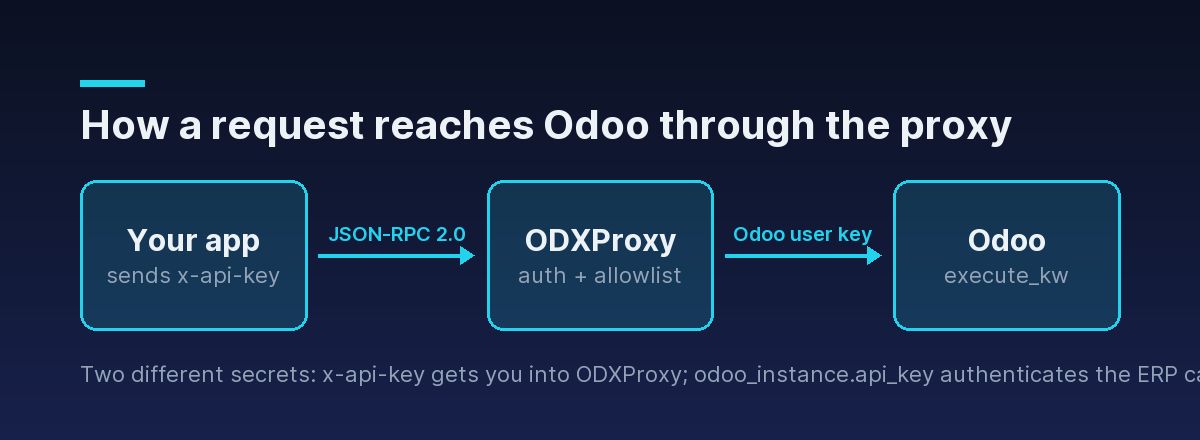
The flow is: your app sends a JSON-RPC request with the proxy's x-api-key; ODXProxy checks that
key and confirms the requested action is on its allowlist; then it forwards the call to the Odoo
instance named in odoo_instance, authenticating there with the Odoo user's api_key.
Check the instance before you touch credentials
Before you debug keys, confirm the proxy can even reach your Odoo server. The
POST /api/odoo/version endpoint asks Odoo for its public version banner. It still needs the proxy's
x-api-key, but no Odoo credentials at all — so it cleanly separates "can we reach Odoo?" from
"are my Odoo credentials right?":
curl -X POST https://your-proxy.example.com/api/odoo/version \
  -H "Content-Type: application/json" \
  -H "x-api-key: $ODX_PROXY_KEY" \
  -d '{ "id": "version-1", "url": "https://erp.example.com" }'
A version banner coming back means the URL is correct and the network path works. If this fails, fix that first — no amount of key-fiddling will help if the proxy can't reach the server.
Your first authenticated call
The main entry point is POST /api/odoo/execute. Every request carries the proxy key in the
x-api-key header and describes the Odoo call in the body. Here's a search_read that reads five
companies — a good "hello world" because it only needs read access:
curl -X POST https://your-proxy.example.com/api/odoo/execute \
  -H "Content-Type: application/json" \
  -H "x-api-key: $ODX_PROXY_KEY" \
  -d '{
    "id": "first-call-1",
    "action": "search_read",
    "model_id": "res.partner",
    "params": [[["is_company", "=", true]]],
    "keyword": { "fields": ["name", "email"], "limit": 5 },
    "odoo_instance": {
      "url": "https://erp.example.com",
      "db": "prod",
      "user_id": 2,
      "api_key": "<the Odoo user API key>"
    }
  }'
A few things worth understanding rather than copying:
actionis one of nine allowed actions (search_count,search,read,fields_get,search_read,create,write,unlink,call_method). Anything else is rejected before it ever reaches Odoo.paramsis a JSON array of positional arguments (default[]). Forsearch_readthe first positional argument is the domain filter, which is why it's wrapped one level deep:[[["is_company", "=", true]]].keywordis a JSON object of keyword arguments (default{}) — herefieldsandlimit.idis a string you choose; it's echoed back so you can correlate responses with requests.
On success you get HTTP 200 and a JSON-RPC envelope whose result holds whatever Odoo returned:
{
  "jsonrpc": "2.0",
  "id": "first-call-1",
  "result": [
    { "id": 9, "name": "Gemini Furniture", "email": "info@gemini.example" },
    { "id": 14, "name": "Azure Interior", "email": "hello@azure.example" }
  ]
}
That's a complete round trip: authenticated at the proxy, authenticated at Odoo, and back with data.
A note on the protocol: JSON-RPC, not REST
If you came looking for REST routes like GET /partners, that's the other mental-model shift worth
making early. The Odoo API — and ODXProxy in front of it — speaks JSON-RPC 2.0, not REST: one
endpoint, the method name in the body (action), and the arguments in params and keyword. There
are no per-model URLs to learn or version; you change model_id and action instead, and every
response comes back in the same { "jsonrpc": "2.0", "id", "result" | "error" } envelope. Once
you've authenticated one call, you've authenticated all of them — reading, writing, and calling
model methods are the same shape with a different action.
Handling authentication errors (and the HTTP 200 trap)
This is where Odoo integrations quietly break. You cannot tell success from failure by the HTTP status alone. There are two distinct layers of failure, and you have to check for them in order.
Layer 1 — proxy-level failures use a non-200 status. If the proxy key is wrong or missing, you
get HTTP 401 with a JSON-RPC error and a null id:
{
  "jsonrpc": "2.0",
  "id": null,
  "error": { "code": -32000, "message": "Authentication failed" }
}
These proxy-layer codes are worth recognizing:
| HTTP | code | Meaning |
|---|---|---|
| 401 | -32000 | Missing or wrong x-api-key |
| 400 | -32001 | action not in the allowlist |
| 400 | -32002 | call_method with no fn_name |
| 504 | -32003 | Upstream Odoo call timed out |
| 502 | -32004 | Could not reach the Odoo instance |
Layer 2 — Odoo's own errors come back with HTTP 200. If the proxy accepted your request but
Odoo rejected it — say the user's API key is wrong, or that user lacks access to the model — Odoo
returns a logic error that is passed straight through with a 200 status and a populated error
object:
{
  "jsonrpc": "2.0",
  "id": "first-call-1",
  "error": {
    "code": 200,
    "message": "You are not allowed to access 'Contact' records.",
    "data": { "name": "odoo.exceptions.AccessError" }
  }
}
Note the error.code of 200 here is Odoo's own error code for a server-side exception — it has
nothing to do with the HTTP 200 status. That collision is exactly why you must check both layers.
200 response is not proof of success. Always check the HTTP status first, and then — even on a 200 — check whether the body has a populated error field before you read result.Doing it properly in code
Putting the two-step check together, a robust call in Python looks like this:
import requests

PROXY_URL = "https://your-proxy.example.com/api/odoo/execute"
PROXY_API_KEY = "<the proxy x-api-key>"

payload = {
    "id": "first-call-1",
    "action": "search_read",
    "model_id": "res.partner",
    "params": [[["is_company", "=", True]]],
    "keyword": {"fields": ["name", "email"], "limit": 5},
    "odoo_instance": {
        "url": "https://erp.example.com",
        "db": "prod",
        "user_id": 2,
        "api_key": "<the Odoo user API key>",
    },
}

resp = requests.post(PROXY_URL, headers={"x-api-key": PROXY_API_KEY}, json=payload, timeout=20)

# Step 1: proxy-level failures are non-200.
resp.raise_for_status()

body = resp.json()

# Step 2: a 200 can still carry an Odoo error.
if body.get("error"):
    err = body["error"]
    raise RuntimeError(f"Odoo error {err['code']}: {err['message']}")

partners = body["result"]
print(partners)
If you'd rather not hand-roll the envelope and the two-step check on every call, the
Python SDK wraps exactly this: you configure the proxy URL and x-api-key once,
bind an Odoo instance once, and call session.search_read(...), with error codes mapped to typed
exceptions.
Common authentication mistakes
When a call won't authenticate, it's almost always one of these:
- The two keys are swapped — the proxy
x-api-keyplaced inodoo_instance.api_key, or vice versa. A401with code-32000points at the proxy key; a200carrying an OdooAccessErrorpoints at the Odoo user key. - Wrong
db— the database name is case-sensitive and must match your instance exactly. - A trailing slash or wrong scheme in
url— use the bare origin, e.g.https://erp.example.com, nothttps://erp.example.com/or a path. - The API key was revoked — keys can be deleted in Odoo at any time; regenerate and retry.
- The user lacks access to the model or record — that's an Odoo access error (HTTP
200), not a proxy problem. Grant the right access or use a purpose-built integration user. - A slow call looks like an auth failure — a
-32003timeout (HTTP504) means the upstream Odoo call took too long, not that your credentials are wrong. Raise the limit per request with anx-request-timeoutheader (integer seconds).
Where to go next
You now have the whole authentication picture: an Odoo uid and API key for the ERP call, the
proxy's x-api-key for the gateway, a first search_read, and a two-step error check that survives
the HTTP 200 trap.
- Read the full request and response contract in the API reference.
- Reach for the Python SDK to skip the boilerplate.
- Make your calls robust with Odoo API error handling — the full two-layer model and a reusable handler.
- Next in this series: turning that domain filter into precise queries in Odoo search_read, in depth.