Calling Custom Odoo Methods with call_method
The eight direct actions cover CRUD and queries. For everything else — action_post, name_search, custom business logic — you use call_method. Here's how.
ODXProxy Team · Jul 4, 2026 · 6 min read
Sooner or later, reading and writing records isn't enough — you need to do something in Odoo:
confirm a sale order, post an invoice, run a wizard, call a bit of custom business logic your team
wrote. None of those are CRUD, so none of them have a dedicated action. That's what call_method
is for: it's the escape hatch that lets you invoke any Odoo model method by name. This guide
shows how to call custom Odoo methods through the proxy, what goes in params versus keyword, and
the one required field that everyone forgets.
When you need call_method
ODXProxy exposes nine actions. Eight of them are fixed operations — search_count, search, read,
fields_get, search_read, create, write, unlink — and they cover querying and CRUD. The
ninth, call_method, is the generic one: it forwards a call to any method on the model, named by
you.
The rule of thumb is simple: if one of the eight direct actions does the job, use it — it's
clearer and self-documenting. Reach for call_method when the thing you want isn't CRUD:
- Workflow transitions —
action_confirmon asale.order,action_poston anaccount.move. - Built-in helpers —
name_search,default_get,copy,name_get. - Chatter and messaging —
message_postto add a note to a record's log. - Your own custom methods — anything a custom module defines on its models.
The shape of a call_method request
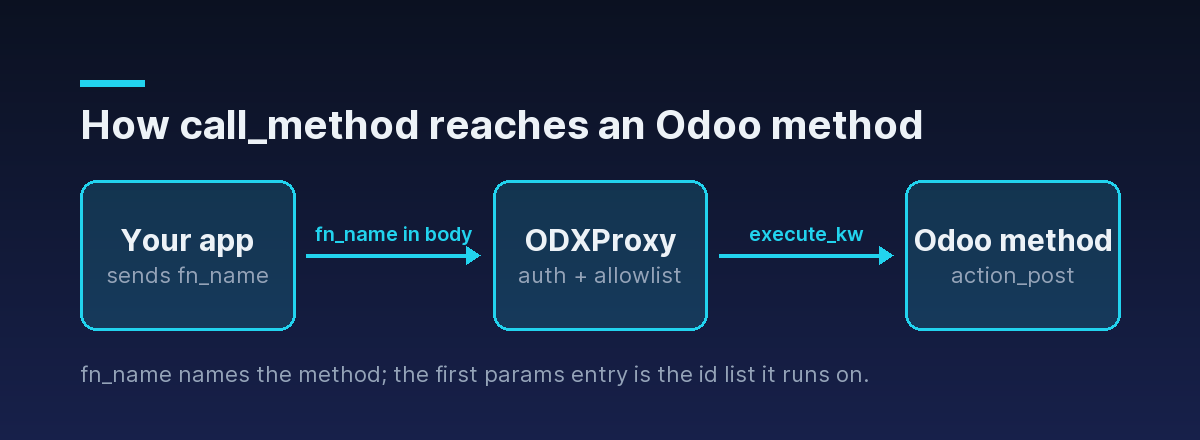
A call_method request looks like any other, with two differences: action is "call_method", and
you must supply a non-empty fn_name — the actual Odoo method to invoke. Here's how you post
an invoice (account.move.action_post):
{
  "id": "post-1",
  "action": "call_method",
  "model_id": "account.move",
  "fn_name": "action_post",
  "params": [[128]],
  "keyword": {},
  "odoo_instance": {
    "url": "https://erp.example.com",
    "db": "prod",
    "user_id": 2,
    "api_key": "<the Odoo user API key>"
  }
}
The same call as raw HTTP, with the two distinct credentials — the proxy's x-api-key header and the
Odoo user's api_key in the body:
curl -X POST https://your-proxy.example.com/api/odoo/execute \
  -H "Content-Type: application/json" \
  -H "x-api-key: $ODX_PROXY_KEY" \
  -d '{
    "id": "post-1",
    "action": "call_method",
    "model_id": "account.move",
    "fn_name": "action_post",
    "params": [[128]],
    "keyword": {},
    "odoo_instance": {
      "url": "https://erp.example.com", "db": "prod",
      "user_id": 2, "api_key": "<the Odoo user API key>"
    }
}'action is "call_method" but fn_name is missing or empty, the proxy rejects the request before it ever reaches Odoo with HTTP 400 and JSON-RPC code -32002. This is a proxy-layer failure, so it comes back with a non-200 status — one of the few Odoo-related errors that does.Why params starts with a list of ids
Odoo methods that operate on records are methods on a recordset — they run against a set of
records. When the call is marshalled over the wire, that recordset becomes the first positional
argument: the list of ids the method should act on. That's why params above is [[128]] — the
argument list contains one argument, the id list [128].
Everything after that first id-list argument is the method's own further arguments, in order.
Calling name_search, for instance, takes a search string as its first real argument and options as
keywords:
{
  "id": "ns-1",
  "action": "call_method",
  "model_id": "res.partner",
  "fn_name": "name_search",
  "params": ["Azure"],
  "keyword": { "limit": 8 }
}
Here there's no id list because name_search is a class-level lookup, not something you run on
specific records — its first positional argument is the search term. The shape of params always
mirrors the method's own signature:
params— positional arguments, in order. For record methods, the first is the id list.keyword— keyword arguments as a JSON object (default{}).
When in doubt, check the method's Python signature in the Odoo source or your custom module: whatever
comes after self maps directly onto params and keyword.
Passing context
Many Odoo methods change behavior based on context — the language, company, or custom flags in
play. You pass it as a context object inside keyword. For example, creating a record in a
specific language while suppressing the change-tracking log entries:
{
  "id": "ctx-1",
  "action": "call_method",
  "model_id": "product.template",
  "fn_name": "copy",
  "params": [[55]],
  "keyword": { "context": { "lang": "fr_FR", "tracking_disable": true } }
}
copy duplicates record 55; the context tells Odoo which language to translate labels into and, with
tracking_disable, to skip writing chatter entries for the new record.
Return values vary — read the method
Unlike the CRUD actions, which have predictable returns, call_method gives back whatever the
method returns, verbatim, in result. That might be:
- a boolean (
action_postreturnstrueon success), - a list of
[id, name]pairs (name_search), - an action dict describing a window to open (many
action_*methods on wizards), or - nothing meaningful at all.
{
  "jsonrpc": "2.0",
  "id": "ns-1",
  "result": [[14, "Azure Interior"], [9, "Azure Furniture Co."]]
}
Because the shape isn't fixed, always check the specific method's documentation or source for what it returns rather than assuming.
The HTTP 200 trap applies here too
call_method runs arbitrary business logic, which means it's more likely than a plain read to hit
a validation rule, a workflow guard, or a UserError raised on purpose. All of those come back as
Odoo logic errors with an HTTP 200 and a populated error object — trying to post an already
posted invoice, for example:
{
  "jsonrpc": "2.0",
  "id": "post-1",
  "error": {
    "code": 200,
    "message": "This move is already posted.",
    "data": { "name": "odoo.exceptions.UserError" }
  }
}
So the two-step check is non-negotiable: verify the HTTP status first (a non-200 like -32002 is a
proxy-layer problem), then — even on a 200 — check for a populated error before reading result.
The complete two-layer pattern and a reusable handler are in
Odoo API error handling.
Where to go next
call_method is how you reach past CRUD into Odoo's real business logic: set action to
"call_method", name the method in fn_name (required, non-empty), put the id list first in
params, and read the method's own docs for what comes back.
- Start at the beginning with authenticating to the Odoo API.
- Get the ids to act on with the Odoo search_read example.
- See the allowed actions and the
fn_namerule in the actions reference, and the full envelope in the API reference. - Let the Python SDK handle the envelope — it exposes
call_method(fn_name, ...)directly.