Odoo API Error Handling: Codes, Retries, and the 200 Trap
Odoo API errors come in two layers — proxy failures with non-200 codes and Odoo logic errors hidden inside HTTP 200. Here's how to handle every case cleanly.
ODXProxy Team · Jul 3, 2026 · 8 min read
Good Odoo API error handling comes down to one uncomfortable fact: you cannot tell whether a call
succeeded by looking at the HTTP status alone. A request can come back 200 OK and still be a
failure, and the reason sits in two different places depending on which layer failed. Get that
model right and your integration degrades gracefully instead of silently corrupting data. This guide
covers both layers, the full error-code table, a reusable handler, and when it's safe to retry.
Two layers of failure
Every call through ODXProxy passes through two checkpoints, and either can reject it:
- The proxy layer — authentication, the action allowlist, reaching your Odoo instance, and the
license. When this layer fails, you get a non-200 HTTP status and a JSON-RPC
errorobject. - The Odoo layer — access rights, validation rules, missing records, and any exception raised by
Odoo's business logic. When this layer fails, the proxy passes Odoo's error straight through with
an HTTP
200and a populatederrorobject.
That second case is the one that bites people. The two-step check below is non-negotiable:
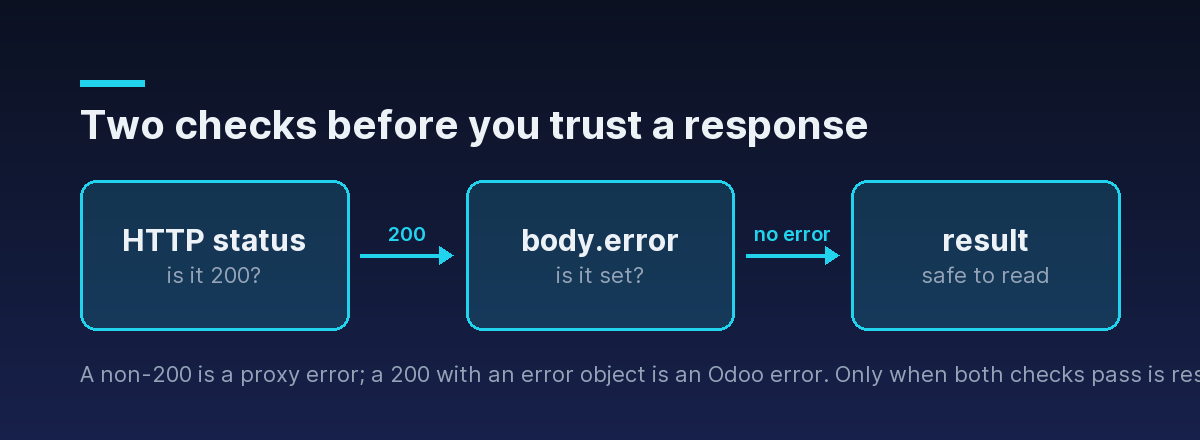
Check the HTTP status first. If it isn't 200, it's a proxy-level failure — read the JSON-RPC
error. If it is 200, you still aren't done: check whether the body has a populated error
field before you trust result.
Proxy-level errors (non-200)
Proxy failures use a specific HTTP status paired with a JSON-RPC error code. Learn to recognize
them, because each points at a different fix:
| HTTP | code | Meaning | What to do |
|---|---|---|---|
| 401 | -32000 | Missing or wrong x-api-key | Fix the proxy key (not the Odoo key) |
| 400 | -32001 | action not in the allowlist | Use one of the nine actions, or call_method |
| 400 | -32002 | call_method with no fn_name | Supply a non-empty fn_name |
| 504 | -32003 | Upstream Odoo call timed out | Retry with backoff; raise x-request-timeout |
| 502 | -32004 | Could not reach the Odoo instance | Check the instance URL/network; retry |
| 500 | -32005 | Proxy couldn't decode Odoo's response | Usually transient; retry, then escalate |
| 403 | 0 | Proxy license expired or invalid | Ops issue — renew the license |
On a 401, note that the id comes back as null: the proxy rejected the request before it could
parse your body, so it has no request id to echo. That null id is itself a signal that you never
reached Odoo.
-32000 auth error is about the proxy's x-api-key. If your keys are the problem but the call reaches Odoo, you'll instead see an Odoo access error on a 200 — a different layer entirely. Knowing which one you got tells you which of the two secrets to fix. See how to authenticate to the Odoo API for the two-secret model.Odoo-level errors (HTTP 200 with an error)
When the proxy accepts your request but Odoo rejects it, Odoo's own exception is passed through
unchanged, on an HTTP 200:
{
  "jsonrpc": "2.0",
  "id": "req-42",
  "error": {
    "code": 200,
    "message": "You are not allowed to access 'Sales Order' records.",
    "data": { "name": "odoo.exceptions.AccessError" }
  }
}
Two things to notice. First, the error.code here is Odoo's own number — for a server-side
exception it's typically 200, which has nothing to do with the HTTP 200 status; it's a coincidence
of numbering that trips up almost everyone. Second, data carries the useful part: name is the
Odoo exception class, which tells you what kind of failure it was. The ones you'll see most:
AccessError— the Odoo user lacks rights on that model or record.ValidationError— a constraint (a required field, a@api.constrainsrule) was violated.UserError— business logic deliberately rejected the operation.MissingError— you referenced a record id that no longer exists.
A validation failure, for instance, arrives in the same envelope with a different name and a
message you can often surface to the user directly:
{
  "jsonrpc": "2.0",
  "id": "req-43",
  "error": {
    "code": 200,
    "message": "The email address is not valid.",
    "data": { "name": "odoo.exceptions.ValidationError" }
  }
}
These are not retryable. They mean the request was understood and refused — retrying sends the exact same request and gets the exact same refusal.
A reusable error handler
Because both layers populate the same error object, you can centralize handling in one place: parse
error, map known proxy codes to typed exceptions, and treat everything else as an Odoo logic error.
import requests


class OdooProxyError(Exception):
    def __init__(self, code, message, data=None):
        super().__init__(f"[{code}] {message}")
        self.code, self.message, self.data = code, message, data


class AuthError(OdooProxyError): pass
class InvalidActionError(OdooProxyError): pass
class LicenseError(OdooProxyError): pass
class OdooTimeoutError(OdooProxyError): pass
class OdooConnectError(OdooProxyError): pass
class OdooLogicError(OdooProxyError): pass


# Known proxy codes → typed exceptions. Anything else is an Odoo-side error.
PROXY_ERRORS = {
    -32000: AuthError,
    -32001: InvalidActionError,
    -32002: InvalidActionError,
    -32003: OdooTimeoutError,
    -32004: OdooConnectError,
    -32005: OdooProxyError,
    0: LicenseError,
}


def execute(payload, *, proxy_url, proxy_api_key, timeout=20):
    resp = requests.post(
        proxy_url,
        headers={"x-api-key": proxy_api_key},
        json=payload,
        timeout=timeout,
    )

    try:
        body = resp.json()
    except ValueError:
        # A non-JSON body means something in front of the proxy failed (CDN, LB).
        resp.raise_for_status()
        raise OdooProxyError(-32005, "Non-JSON response from the proxy")

    error = body.get("error")
    if error:
        exc_type = PROXY_ERRORS.get(error.get("code"), OdooLogicError)
        raise exc_type(error.get("code"), error.get("message", ""), error.get("data"))

    return body["result"]
Now callers write ordinary Python and catch the failure they care about:
try:
    partners = execute(payload, proxy_url=URL, proxy_api_key=KEY)
except AuthError:
    # wrong proxy key — a config problem, not a data problem
    raise
except OdooLogicError as e:
    # Odoo refused the operation; e.data["name"] says why
    log.warning("Odoo rejected the call: %s", e.data)
This mirrors how the Python SDK behaves out of the box, so if you'd rather not maintain the mapping yourself, reach for that.
Every response also echoes your request id (except a -32000, where it comes back null). Log
that id next to the error, and a vague "the call failed" becomes a specific request you can find in
your own logs and correlate with the proxy's metrics.
Reproducing each error while you build
The fastest way to trust your handler is to trigger each failure on purpose and confirm the right exception is raised:
-32000(auth): send a wrong or emptyx-api-key. Expect a401and anullid.-32001(bad action): setactionto something off the allowlist, like"delete_all".-32002(missing fn_name): useaction: "call_method"with nofn_name.-32004(bad gateway): pointodoo_instance.urlat a host that isn't running Odoo.- An Odoo
AccessError(HTTP200): read a model the integration user has no rights to, such as an accounting model from a portal-level user.
It's a five-minute exercise that saves hours of guesswork when a real failure shows up in production.
Timeouts and retries
Two of the proxy codes are transient — the request was fine, but something upstream hiccuped:
-32003(504, timeout) — Odoo took longer than the limit. Raise the ceiling for slow calls by sending anx-request-timeoutheader (integer seconds); the proxy default is 15.-32004(502, bad gateway) — the proxy briefly couldn't reach Odoo.
Both are reasonable to retry with exponential backoff. The others (-32000, -32001, -32002, 0,
and any Odoo logic error) are deterministic — retrying just repeats the failure.
import time

RETRYABLE = (OdooTimeoutError, OdooConnectError)


def execute_with_retry(payload, *, proxy_url, proxy_api_key, attempts=3):
    for attempt in range(1, attempts + 1):
        try:
            return execute(payload, proxy_url=proxy_url, proxy_api_key=proxy_api_key)
        except RETRYABLE:
            if attempt == attempts:
                raise
time.sleep(2 ** (attempt - 1)) # 1s, 2s, 4s, ...search, read, search_read, search_count, and fields_get can be repeated safely. A create, write, or unlink that timed out may have already applied in Odoo — retrying blindly can double-create records. For those, verify state first, or make the operation idempotent with an external key.Don't swallow the license error
The one proxy code that isn't a code you can fix in your client is 0 (HTTP 403, "Invalid
License"). It means the proxy itself is running with an expired or invalid license, so every call
fails until it's renewed. Surface it loudly to your ops channel rather than folding it into a generic
"request failed" — it needs a human, not a retry.
Where to go next
Solid error handling is two checks, one code table, and a clear line between "retry this" and "fix this." With the handler above, every failure becomes a typed exception you can act on.
- See the full error catalog and response envelope in the API reference.
- Let the Python SDK map codes to exceptions for you.
- Haven't made your first call yet? Start with authenticating to the Odoo API, then put it to work with Odoo search_read.
- Wondering which of these problems a gateway should own versus your own code? See what ODXProxy solves, and what it doesn't.