Odoo Domain Filters: Every Operator, with Examples
Every Odoo domain operator with worked examples: the triple syntax, =like vs ilike, child_of, and combining conditions with AND, OR and NOT in real code.
ODXProxy Team · Jul 4, 2026 · 8 min read
Almost every read you make against Odoo is shaped by a domain filter — the little list of
conditions that decides which records come back. Get the domain right and search, search_count,
and search_read all just work; get it subtly wrong and you either pull the whole table or match
nothing at all. This guide is a practical tour of Odoo domain filters: the triple syntax, the
operators worth memorizing, and how to combine conditions with AND, OR, and NOT without losing your
mind in the prefix notation.
What a domain actually is
A domain is a list of conditions, and each condition is a three-element list —
[field, operator, value] — usually called a triple or leaf:
["is_company", "=", true]That reads "the is_company field equals true."
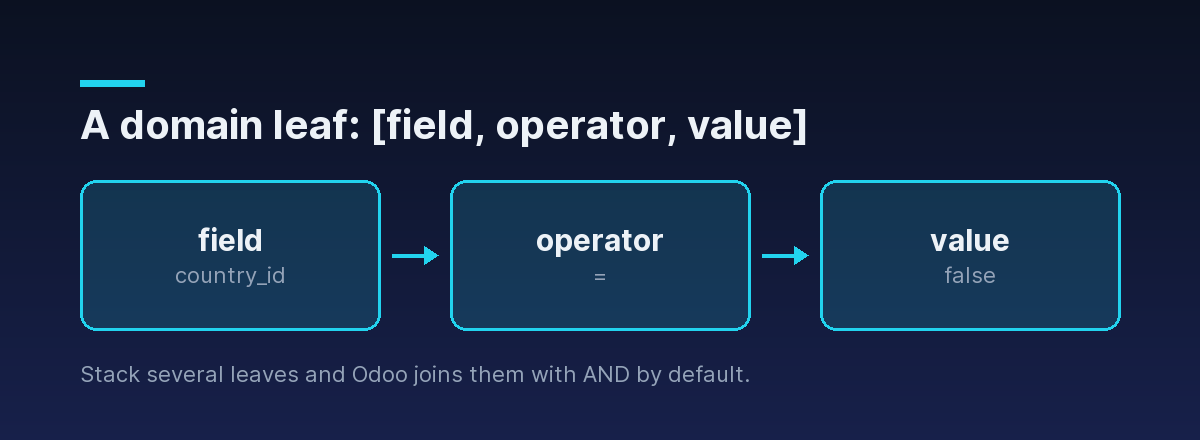
A domain is a list of these leaves:
[
  ["is_company", "=", true],
  ["customer_rank", ">", 0]
]
When you list several leaves like this, Odoo joins them with AND by default — so the domain above means "is a company and has been a customer at least once." That default is the single most important thing to internalize: stacking conditions narrows the result set.
Everywhere a domain appears through ODXProxy, it is the first positional argument in params,
which is itself a JSON array. That's why a domain ends up nested one level deep — params is the
argument list, and its first element is the domain:
{
  "id": "dom-1",
  "action": "search_read",
  "model_id": "res.partner",
  "params": [[["is_company", "=", true], ["customer_rank", ">", 0]]],
  "keyword": { "fields": ["name", "email"], "limit": 50 },
  "odoo_instance": {
    "url": "https://erp.example.com",
    "db": "prod",
    "user_id": 2,
    "api_key": "<the Odoo user API key>"
  }
}
Note the two separate credentials in play: the proxy's x-api-key travels in the HTTP header, while
the Odoo user's api_key sits inside odoo_instance. If that distinction is new, start with
how to authenticate to the Odoo API.
The operators you'll actually use
The operator is the middle element of every leaf. These are the ones that cover the vast majority of real filters:
| Operator | Matches when the field… |
|---|---|
=, != | equals / does not equal the value |
>, >=, <, <= | compares numerically or by date/datetime |
like, not like | contains the substring (case-sensitive) |
ilike, not ilike | contains the substring (case-insensitive) — the usual text search |
=like, =ilike | matches a pattern where you supply the % wildcards yourself |
in, not in | is (or isn't) one of a list of values |
child_of | is a descendant of the given record in a parent/child hierarchy |
parent_of | is an ancestor of the given record in that hierarchy |
A few worth calling out:
ilikeis your default for text.["name", "ilike", "azure"]matches "Azure Interior", "azure interior", and "AZURE" alike. Reach forlikeonly when case actually matters.=like/=ilikehand you the wildcards. Plainilikewraps your term in%...%automatically. With=ilikeyou write the pattern:["name", "=ilike", "azure%"]matches names that start with "azure", and nothing in the middle.intakes a list value, not a repeated leaf:["state", "in", ["draft", "sent"]].
["country_id.code", "=", "US"] filters partners by their country's ISO code without a second lookup. This traversal works in domains, but not in a search_read fields list — fields reads only direct fields on the model.Emptiness: use false, not null
Testing whether a relational or optional field is set trips up almost everyone coming from JSON or
SQL. Odoo domains use the boolean false, never null:
["country_id", "=", false]That's "partners with no country set." To find the ones that do have a country, flip it to
["country_id", "!=", false]. Writing null here doesn't raise a clear error — it just quietly
fails to match the way you expect.
Combining conditions with AND, OR, and NOT
Stacking leaves gives you AND for free. To express OR or NOT, Odoo switches to prefix (Polish) notation: a logical operator token comes before the operands it applies to.
"&"— AND (the default, so you rarely type it)"|"— OR"!"— NOT
Each binary operator ("&", "|") consumes the next two complete expressions; "!" consumes
the next one. So an OR between two leaves looks like this:
"params": [[
  "|",
  ["is_company", "=", true],
  ["email", "!=", false]
]]
That matches records that are companies or have an email address. The "|" binds the two leaves
that follow it.
Nesting AND inside OR
Real filters mix both operators, and the trick is to read them as a tree. Say you want US-based
companies or any partner that belongs to a parent company — that is
OR( AND(company, in US), has-parent ):
"params": [[
  "|",
    "&",
      ["is_company", "=", true],
      ["country_id.code", "=", "US"],
  ["parent_id", "!=", false]
]]
Walk it from the front: the leading "|" needs two expressions. The first is the "&" group (a
company and in the US); the second is the single parent_id leaf. The indentation is just for
humans — Odoo reads the flat list — but laying it out as a tree is the fastest way to keep the
operator counting straight.
Negating a condition
"!" negates the single expression that follows it. To match partners that are not companies in
the US, wrap the "&" group:
"params": [[
  "!",
    "&",
      ["is_company", "=", true],
      ["country_id.code", "=", "US"]
]]
Often you don't need "!" at all — negating a single leaf is cleaner with the operator's inverse
(!=, not in, not ilike). Save "!" for negating a whole compound group.
"&" or "|" must be followed by exactly two complete expressions (a leaf or another operator group). One leaf too few or too many and Odoo either errors or silently matches the wrong set. When a domain misbehaves, count operands before anything else.Filtering on hierarchies with child_of
Odoo models like res.partner, account.account, and product categories are hierarchical —
records point at a parent_id. The child_of operator matches a record and everything beneath it
in that tree, which is perfect for "this company and all its contacts" or "this category and its
subcategories". Filtering res.partner on its own hierarchy field pulls a company (id 3) together
with every contact under it:
"params": [[
  ["id", "child_of", 3]
]]
parent_of is the mirror image: a record and everything above it toward the root. Both save you
from walking the tree yourself with repeated queries.
Date ranges
Dates and datetimes compare with the ordinary >, >=, <, <= operators against ISO-8601
strings. A closed range is just two leaves ANDed together:
"params": [[
  ["create_date", ">=", "2026-01-01 00:00:00"],
  ["create_date", "<", "2026-04-01 00:00:00"]
]]
Use a half-open range (>= start, < next-period-start) rather than <= on an end date — it
sidesteps the "does 23:59:59 count?" ambiguity entirely.
A subtlety: you can only filter on stored fields
You can read a non-stored computed field (Odoo computes it on the fly for the response), but you
cannot put it in a domain — filtering happens in SQL, and a field with no column to query raises
an error. If you need to filter on a computed value, define the field with store=True so it lands
in the database. Not sure whether a field is stored? Ask the model itself with fields_get, covered
in the search_read walkthrough.
The HTTP 200 trap still applies
A malformed domain — an unknown field name, a non-stored field, a bad operator — usually comes back
as an Odoo logic error, and those arrive with an HTTP 200 status and a populated error
object, not a non-200 code. Always check the HTTP status first, then check for error before you
read result. The full two-layer pattern is in
Odoo API error handling.
Where to go next
Domains are the lever behind every query: a list of [field, operator, value] leaves, ANDed by
default, with "|" and "!" in prefix notation for everything more complex.
- Put a domain to work end-to-end in the Odoo search_read example, which covers pagination and field selection.
- See the exact request and response contract in the API reference.
- Skip the envelope boilerplate with the Python SDK, which takes a
domainargument directly. - New to the API? Start with authenticating to the Odoo API.