Odoo search_read Example: Domains, Fields and Paging
search_read filters and reads in one round trip. How params and keyword fit together, how to build a domain, and how to paginate a large result set.
ODXProxy Team · Jul 3, 2026 · 8 min read
If you've ever called Odoo's search and gotten back a bare list of ids, then had to make a second
read call to turn those ids into actual data, search_read is the shortcut you want. This
Odoo search_read example walks through the whole thing: how the domain filter and field list map
onto the request, how to build filters that combine conditions, and how to page through large
result sets — all in a single round trip.
What search_read does
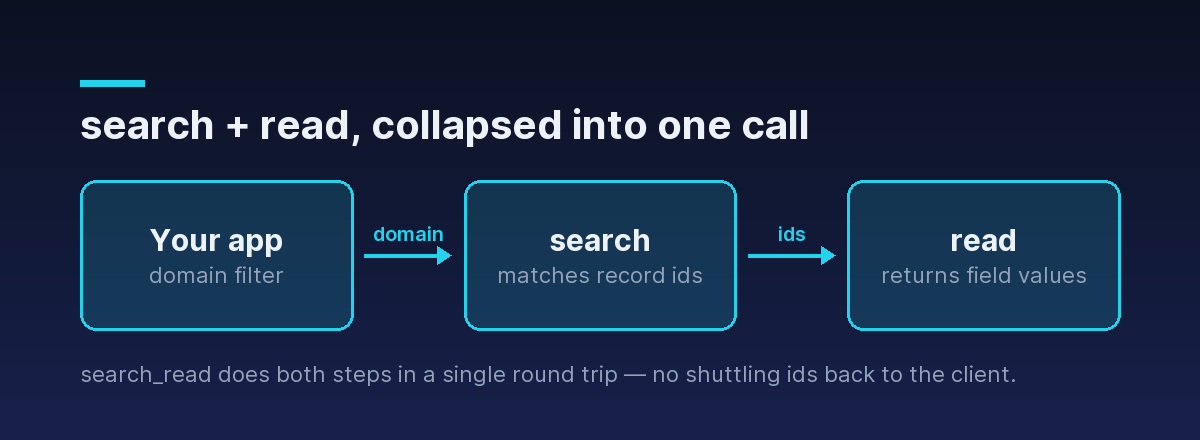
search and read are two halves of one job. search takes a domain filter and returns the ids of
matching records. read takes ids and returns field values. Doing them separately means two API
calls and some id-juggling in your client. search_read fuses them: give it a domain and a list of
fields, and it returns the matching records with those fields already populated.
It is one of the nine actions ODXProxy exposes directly (alongside search, read, search_count,
create, write, unlink, fields_get, and call_method), so you can call it by name without
routing through call_method.
The request shape: params vs keyword
Every call to POST /api/odoo/execute splits its arguments into two fields, and search_read is the
clearest place to understand the split:
paramsis a JSON array of positional arguments. Forsearch_read, the first positional argument is the domain — so the domain sits one level deep insideparams.keywordis a JSON object of keyword arguments:fields,limit,offset,order.
Here's a request that reads the name and email of up to 50 companies:
{
  "id": "sr-1",
  "action": "search_read",
  "model_id": "res.partner",
  "params": [[["is_company", "=", true]]],
  "keyword": { "fields": ["name", "email"], "limit": 50 },
  "odoo_instance": {
    "url": "https://erp.example.com",
    "db": "prod",
    "user_id": 2,
    "api_key": "<the Odoo user API key>"
  }
}
That params value looks over-nested until you unpack it: params is the argument list, its single
element is the domain, and the domain is itself a list of conditions. So [[["is_company", "=", true]]] means "one positional argument, which is a domain containing one condition."
The same call as a raw HTTP request looks like this — note the two separate credentials, the proxy's
x-api-key header and the Odoo user's api_key inside the body:
curl -X POST https://your-proxy.example.com/api/odoo/execute \
  -H "Content-Type: application/json" \
  -H "x-api-key: $ODX_PROXY_KEY" \
  -d '{
    "id": "sr-1",
    "action": "search_read",
    "model_id": "res.partner",
    "params": [[["is_company", "=", true]]],
    "keyword": { "fields": ["name", "email"], "limit": 50 },
    "odoo_instance": {
      "url": "https://erp.example.com", "db": "prod",
      "user_id": 2, "api_key": "<the Odoo user API key>"
    }
  }'
The response is a 200 with the records in result:
{
  "jsonrpc": "2.0",
  "id": "sr-1",
  "result": [
    { "id": 9, "name": "Gemini Furniture", "email": "info@gemini.example" },
    { "id": 14, "name": "Azure Interior", "email": "hello@azure.example" }
  ]
}[id, display_name] pair, not a bare id. Reading country_id, for example, yields something like [233, "United States"] — handy, because you get the label without a second lookup.Building the domain filter
The domain is where search_read earns its keep. A domain is a list of conditions, each a
[field, operator, value] triple. List several and they are combined with AND by default:
"params": [[
  ["is_company", "=", true],
  ["country_id", "!=", false]
]]
That reads "companies that have a country set." These are the operators you'll reach for most:
| Operator | Matches when the field… |
|---|---|
=, != | equals / does not equal the value |
>, >=, <, <= | compares numerically or by date |
like, not like | contains the substring (case-sensitive) |
ilike, not ilike | contains the substring (case-insensitive) — the usual choice for text search |
in, not in | is (not) one of a list of values |
child_of | is a descendant of the given record in a parent/child hierarchy |
So a case-insensitive name search for anything containing "furniture" is
["name", "ilike", "furniture"].
To combine conditions with OR, Odoo uses prefix (Polish) notation: an operator token comes
before the operands it joins. "|" is OR, "&" is AND (the default), and "!" is NOT:
"params": [[
  "|",
  ["is_company", "=", true],
  ["email", "!=", false]
]]
This matches records that are companies or have an email address. The "|" applies to the two
conditions that follow it. Nest the operators to build richer logic — each binary operator consumes
the next two terms.
Combining AND and OR
Real filters mix both. Say you want US-based companies or any partner that belongs to a parent
company. Read it as OR(AND(company, US), has-parent):
"params": [[
  "|",
    "&",
      ["is_company", "=", true],
      ["country_id.code", "=", "US"],
  ["parent_id", "!=", false]
]]
The leading "|" joins the next two complete expressions: the first is the "&" group (a company
and in the US), the second is the single parent_id condition. Note country_id.code — Odoo
domains let you traverse relational fields with a dotted path, so you can filter on the country's
code without a separate lookup. (This dotted traversal works in domains, but not in the fields list
— fields reads only direct fields on the model.)
false to mean "empty." Use ["country_id", "=", false] for "no country," not ["country_id", "=", null] — Odoo domains use false, not null.Choosing fields (and why you always should)
If you omit fields, Odoo returns every field on the model — often dozens, including large text
and computed fields you don't need. Always pass an explicit fields list: it cuts payload size,
reduces load on the Odoo server, and makes your response predictable.
"keyword": { "fields": ["name", "email", "country_id"] }store=True so it lands in the database.If you only need to know how many records match — not their contents — don't use search_read at
all; use search_count, which returns a single integer and skips reading field data entirely.
Discovering field names with fields_get
If you're not sure what a model's fields are called, ask Odoo. The fields_get action describes a
model's fields — their technical names, types, labels, and whether they're stored:
{
  "id": "fg-1",
  "action": "fields_get",
  "model_id": "res.partner",
  "params": [],
  "keyword": { "attributes": ["string", "type"] }
}
Use it once while building an integration to get the exact field names, then pass those into
search_read's fields list.
Pagination and ordering
Large result sets should be paged, not pulled all at once. Three keyword arguments handle it:
limit— the maximum number of records to return.offset— how many matching records to skip before returning.order— a SQL-style sort string, e.g."name asc"or"create_date desc".
To walk a large partner list in pages of 100, ordered by name:
{
  "id": "sr-page-2",
  "action": "search_read",
  "model_id": "res.partner",
  "params": [[["is_company", "=", true]]],
  "keyword": {
    "fields": ["name", "email"],
    "order": "name asc",
    "limit": 100,
    "offset": 100
  }
}
Increment offset by limit for each page. Keep the order stable across pages, otherwise records
can shift between pages as you go. For very large exports, pair a search_count up front so you know
how many pages to expect.
search_read has no default limit. Omit limit on a big model and you'll pull every matching record in one response — always set a limit in production code, even if it's a generous one.search_read vs search, read, and search_count
Reach for the action that returns exactly what you need and no more:
search_count— you only need the number of matches.search— you only need ids (for example, to feed another action likewriteorunlink).read— you already have ids and want their fields.search_read— you have a filter and want the matching records' fields. This is the everyday choice for fetching data.
Don't forget the response check
Like every call through the proxy, a search_read can come back as HTTP 200 and still carry an
error object — an invalid field name or a permissions problem surfaces there, not as a non-200
status. Check the HTTP status first, then check for a populated error before reading result. The
full two-step pattern, and the proxy error codes, are covered in
how to authenticate to the Odoo API.
Where to go next
search_read is the workhorse of reading data from Odoo: one call, a precise domain, an explicit
field list, and paging for scale.
- See the complete request and response contract in the API reference.
- Skip the envelope boilerplate with the Python SDK, which exposes
session.search_read(model, domain, fields, limit, ...)directly. - New to the API? Start with authenticating to the Odoo API.