Odoo API Gateway: Why and How to Put One in Front
An Odoo API gateway centralizes auth, an action allowlist, timeouts, and multi-instance routing in front of Odoo's JSON-RPC. Here's what it does and how to build one.
ODXProxy Team · Jul 11, 2026 · 9 min read
Once more than one app starts talking to Odoo, the same questions keep coming back: where do the credentials live, which methods is a client allowed to call, what happens when Odoo is slow, and how do you point the same integration code at staging and production? An Odoo API gateway answers all four in one place. It's a thin service that sits between your clients and Odoo's JSON-RPC endpoint, authenticates every request, restricts which model methods can run, enforces timeouts, and routes to the right Odoo instance — so your application code stops carrying that responsibility. This guide explains what an Odoo API gateway does, how it differs from a plain reverse proxy, and how ODXProxy implements one.
Reverse proxy vs. API gateway (they're not the same)
If you've already put Odoo behind an nginx reverse proxy, you have
the transport layer solved: TLS termination, proxy_mode, forwarding the real client IP. A reverse
proxy moves bytes; it doesn't understand that the body is an Odoo RPC call.
An API gateway works one layer up. It reads the request payload and makes decisions based on what the call is trying to do:
- Authentication — reject anything without a valid gateway credential before it reaches Odoo.
- Authorization / allowlisting — permit only a known set of actions, so a leaked key can't call arbitrary model methods.
- Request shaping — enforce timeouts, set response compression, normalize the request/response envelope.
- Routing — send the call to the correct Odoo instance, chosen per request rather than baked into one upstream block.
You want both. The reverse proxy handles the network; the gateway handles the API contract. ODXProxy is the gateway half — you can run it behind nginx or expose it directly.
What an Odoo API gateway centralizes
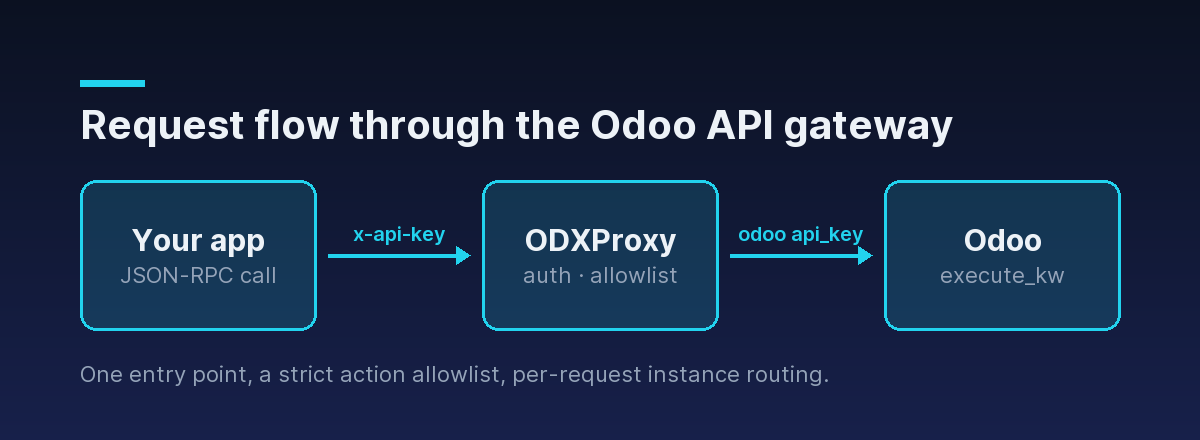
Without a gateway, every client that talks to Odoo has to hold the Odoo database name, a user id, and that user's API key, and each one re-implements error handling and retries. That's a lot of copies of your most sensitive credentials and a lot of duplicated logic. A gateway pulls the cross-cutting concerns into one hop:
- One authentication point. Clients present a single gateway key; the gateway holds (or is handed) the Odoo credentials. You rotate and audit in one place.
- One protocol shape. Every call is the same JSON-RPC 2.0 envelope regardless of the Odoo model or method, so clients don't learn a new URL per resource.
- One allowlist. The gateway decides which actions are legal. Everything else is refused up front.
- One place for operational limits. Timeouts, and (on the roadmap) rate limiting and quotas, live at the gateway instead of scattered across clients.
The gateway request shape
ODXProxy exposes a single main entry point, POST /api/odoo/execute, and every data call goes
through it. The gateway authenticates the caller with the x-api-key header, then forwards the call
to the Odoo instance named inside the body:
curl -X POST https://your-proxy.example.com/api/odoo/execute \
  -H "Content-Type: application/json" \
  -H "x-api-key: $ODX_PROXY_KEY" \
  -d '{
    "id": "gw-1",
    "action": "search_read",
    "model_id": "res.partner",
    "params": [[["is_company", "=", true]]],
    "keyword": { "fields": ["name", "email"], "limit": 20 },
    "odoo_instance": {
      "url": "https://erp.example.com",
      "db": "prod",
      "user_id": 2,
      "api_key": "<the Odoo user API key>"
    }
  }'
A few things the gateway is doing for you in that one call:
actionmust be one of nine allowlisted actions (more on that below). Anything else is rejected before it reaches Odoo.paramsis a JSON array of positional arguments (default[]); forsearch_readthe first positional argument is the domain filter, which is why it's nested:[[["is_company", "=", true]]].keywordis a JSON object of keyword arguments (default{}) — herefieldsandlimit.odoo_instancecarries the target connection, chosen per request. That's what makes the same gateway serve many instances.
The two-key model the gateway enforces
The single most important thing to keep straight is that a gateway introduces two distinct secrets, and they are never interchangeable:
x-api-key— the gateway's key. It authenticates the caller to the gateway and travels as an HTTP header. It's the same regardless of which Odoo instance you target.odoo_instance.api_key— the Odoo user's key. It authenticates the actual ERP call and is sent per request in the body.
401. A 401 with code -32000 is a gateway-key problem; an Odoo AccessError returned with HTTP 200 is an Odoo user-key problem. See how to authenticate to the Odoo API for the full breakdown.Allowlisting: the gateway's security core
The reason an API gateway is a security upgrade over exposing Odoo directly is the action
allowlist. The proxy will only forward these nine actions, and rejects anything else with HTTP
400 and JSON-RPC code -32001:
| Action | Meaning |
|---|---|
search_count | Count records matching a domain. |
search | Return IDs matching a domain. |
read | Read fields for a list of IDs. |
fields_get | Describe a model's fields. |
search_read | Combined search + read. |
create | Create record(s). |
write | Update record(s) by ID. |
unlink | Delete record(s) by ID. |
call_method | Invoke a named model method (requires a non-empty fn_name). |
The first eight cover ordinary CRUD. When you need a business method that isn't one of them — posting
an invoice, confirming a sale order — you use call_method and name the method in fn_name:
{
  "id": "gw-post-1",
  "action": "call_method",
  "model_id": "account.move",
  "fn_name": "action_post",
  "params": [[142]],
  "keyword": {},
  "odoo_instance": {
    "url": "https://erp.example.com",
    "db": "prod",
    "user_id": 2,
    "api_key": "<the Odoo user API key>"
  }
}
If action is call_method but fn_name is missing or empty, the gateway refuses it with code
-32002 — it will not guess a method name for you.
Routing to the right Odoo instance
Because the target instance is specified per request in odoo_instance, one gateway fronts many
Odoo servers. The same client code targets staging or production by changing the url, db,
user_id, and api_key — nothing about the gateway URL or your x-api-key changes. For an agency
running one instance per client, that means a single gateway deployment serves every tenant, with no
per-instance upstream configuration to maintain.
There's also a credential-free health check. POST /api/odoo/version asks the target Odoo for its
public version banner — it needs the gateway key but no Odoo credentials — so you can confirm the
gateway can reach an instance before you debug per-instance keys:
curl -X POST https://your-proxy.example.com/api/odoo/version \
  -H "Content-Type: application/json" \
  -H "x-api-key: $ODX_PROXY_KEY" \
  -d '{ "id": "ping-1", "url": "https://erp.example.com" }'
Timeouts and the errors a gateway surfaces
A gateway is also where you handle Odoo being slow or unreachable without every client re-inventing
it. The upstream call uses a default timeout (15 seconds), overridable per request with an integer
x-request-timeout header. When something goes wrong, the gateway maps it to a clear code:
| HTTP | code | Meaning |
|---|---|---|
| 401 | -32000 | Missing or wrong x-api-key |
| 400 | -32001 | action not in the allowlist |
| 400 | -32002 | call_method with no fn_name |
| 504 | -32003 | Upstream Odoo call timed out |
| 502 | -32004 | Could not reach the Odoo instance |
| 500 | -32005 | Internal gateway error |
The one rule that catches everyone: an HTTP 200 can still carry an error. Only gateway-layer
failures use a non-200 status. When Odoo itself rejects a call — an access error, a validation
constraint — that comes back with HTTP 200 and a populated error object, passed straight through:
{
  "jsonrpc": "2.0",
  "id": "gw-1",
  "error": {
    "code": 200,
    "message": "You are not allowed to access 'Contact' records.",
    "data": { "name": "odoo.exceptions.AccessError" }
  }
}200 — check whether the body has an error field before reading result. The Odoo API error handling guide has a reusable two-step handler.Should you build one or run one?
You can build a minimal gateway yourself: a small service that checks a shared key, validates the
action against an allowlist, forwards execute_kw to the right Odoo instance, and normalizes
errors. The tricky parts are the ones that are easy to get subtly wrong — the two-step error check,
per-request timeouts, multi-instance routing, and never leaking the difference between "wrong gateway
key" and "wrong Odoo key" back to a caller.
ODXProxy is that gateway as a ready-made service. It's early (v0.1.0), so treat features beyond the shipped request path — the allowlist, per-request routing, timeouts, the version health check — as the current surface, and things like rate limiting and quotas as roadmap. What ships today is the core an Odoo API gateway is for: one authenticated entry point, a strict action allowlist, and per-request instance routing. For the problem-by-problem version of that trade-off — including a frank list of what the proxy deliberately doesn't do — see what ODXProxy solves, and what it doesn't.
Where to go next
- Solve the transport layer underneath the gateway with an
Odoo reverse proxy on nginx, and get
proxy_moderight with the Odoo proxy mode configuration guide. - Understand the failure modes with Odoo 502 and 504 gateway errors.
- Read the full request/response contract in the API reference, or skip the boilerplate with the Python SDK.