Fixing Odoo 502 Bad Gateway and 504 Gateway Timeout
Odoo 502 means a dead upstream, 504 a request that ran too long. How to tell them apart fast, and the proxy and odoo.conf fixes that resolve each one.
ODXProxy Team · Jul 6, 2026 · 7 min read
An Odoo 502 Bad Gateway and an Odoo 504 Gateway Timeout look similar in the browser — a blank
error page where your ERP should be — but they have opposite causes, and reaching for the wrong fix
wastes an afternoon. A 502 means your proxy reached out for Odoo and got nothing usable back. A
504 means it reached Odoo fine, but Odoo took too long to answer. One points at connectivity and
crashes; the other points at timeouts and slow requests. This guide separates them, gives you a fast
way to tell which you're looking at, and fixes each at both the proxy and in odoo.conf.
502 vs 504 in one line each
Both are the proxy (usually nginx) reporting on its conversation with the Odoo upstream:
| Error | HTTP | What the proxy is saying | Where to look |
|---|---|---|---|
| Bad Gateway | 502 | "I connected but got no valid response" — Odoo is down, crashed, or on the wrong port | Odoo process, upstream address, memory |
| Gateway Timeout | 504 | "Odoo is up but didn't answer in time" — the request ran past a timeout | Request duration, worker limits, proxy timeouts |
Keep that split in mind and every fix below slots into one column or the other.
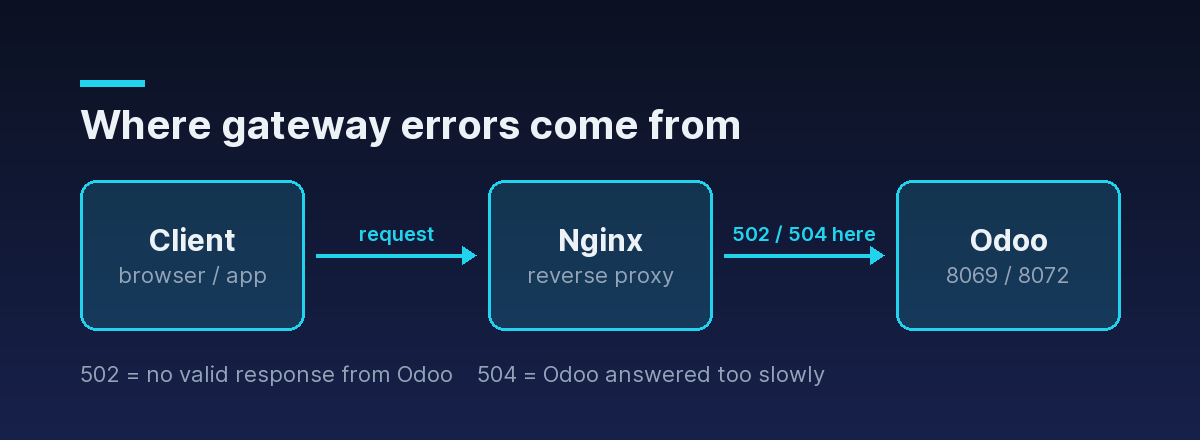
Both errors are your proxy reporting on the same hop — its conversation with the Odoo upstream. That's why the client and the browser look identical; the difference is entirely in what happened between nginx and Odoo.
Diagnosing a 502 Bad Gateway
A 502 almost always means the upstream isn't answering. Work through these in order.
1. Is Odoo actually running? The number-one cause is a stopped or crashed service.
systemctl status odoo          # is it active?
sudo ss -ltnp | grep -E '8069|8072'   # is it listening on the expected ports?
If Odoo isn't listening on 8069 (and 8072 for websockets), nginx has nothing to talk to. Start it
and tail the log while you reload the page:
sudo journalctl -u odoo -f2. Does the proxy's upstream address match? A 502 is guaranteed if nginx points at a port or
socket Odoo isn't on. Confirm the upstream block matches odoo.conf:
upstream odoo { server 127.0.0.1:8069; }If Odoo binds only to 127.0.0.1 but nginx points at a different interface, or the ports drifted
after a config change, you get a 502 even though Odoo is healthy.
3. Did a worker die mid-request — usually OOM? If the page works, then 502s under load, Odoo
workers may be getting killed for exceeding the memory ceiling. Check for the kernel's OOM killer or
Odoo's own hard-limit kills:
sudo dmesg | grep -i 'killed process'
sudo journalctl -u odoo | grep -i 'memory\|killed\|LimitMemory'
If that's the cause, raise the memory limits (in bytes) in odoo.conf — and make sure the box has the
RAM to back it:
[options]
limit_memory_soft = 2147483648   ; 2 GB — worker recycled gracefully above this
limit_memory_hard = 2684354560 ; 2.5 GB — worker killed hard above this502 that appears only during heavy reports or imports is a memory or crash symptom, not a timeout. Raising your proxy proxy_read_timeout will do nothing for it — you'll just wait longer for the same 502. Check the Odoo log and dmesg first.Diagnosing a 504 Gateway Timeout
A 504 means Odoo is reachable but the request outlived a timeout. There are two timeouts in play,
and they have to agree.
1. Odoo's own request limit. A multi-worker Odoo kills any request that runs longer than
limit_time_real (wall-clock seconds). A heavy accounting report or a big import can legitimately
exceed the default. Raise it in odoo.conf:
[options]
workers = 4
limit_time_cpu = 600      ; CPU seconds per request
limit_time_real = 1200    ; wall-clock seconds per request (must exceed limit_time_cpu)
limit_time_real must be larger than limit_time_cpu, or Odoo kills the request on CPU time first.
2. The proxy's read timeout. Even with Odoo willing to run for 1200s, nginx returns a 504 the
moment its proxy_read_timeout elapses. The rule that prevents self-inflicted 504s: the proxy
timeout must be greater than or equal to Odoo's limit_time_real.
proxy_read_timeout 1200s;
proxy_connect_timeout 1200s;
proxy_send_timeout 1200s;
Set nginx's timeout below Odoo's limit and nginx gives up while Odoo is still happily working — you get
a 504 for a request that would have succeeded. Get these two numbers aligned and the vast majority of
504s disappear.
504 is often a signal, not just a config gap: a request that needs 20 minutes usually wants to be a background job (a scheduled action or queued task), not a synchronous web request. Raise the timeouts to stop the bleeding, then move the genuinely long work off the request path.A quick decision path
When a gateway error shows up, resolve it fast with this order:
- Read the code.
502→ upstream problem.504→ timeout problem. Don't guess. - For a 502: is Odoo running and listening on the port nginx targets? If yes, check the Odoo log
and
dmesgfor a killed worker (memory). - For a 504: is nginx's
proxy_read_timeout≥ Odoo'slimit_time_real? If not, that's it. If it is, the request is genuinely too slow — profile it or move it to a background job. - Always confirm the fix against the Odoo log with
journalctl -u odoo -fopen while you retry.
If you're still setting up the proxy layer itself, the companion guide on running Odoo behind an nginx reverse proxy has the full annotated config these timeouts belong in.
The same errors at the API layer
If you call Odoo programmatically through an API gateway rather than a browser, 502 and 504 show
up again — because the gateway is doing the same job of forwarding to Odoo and reporting on the round
trip. Through ODXProxy, these map to specific JSON-RPC error codes so your client can tell
them apart in code instead of parsing an HTML error page:
| HTTP | JSON-RPC code | Meaning | Retry? |
|---|---|---|---|
502 | -32004 | The proxy couldn't reach the Odoo instance | Yes, with backoff |
504 | -32003 | The upstream Odoo call exceeded the timeout | Yes; or raise x-request-timeout |
Both are transient by nature — the request was well-formed, but something upstream hiccuped — so
they're the two codes it's safe to retry with exponential backoff. For a slow-but-valid call you can
also raise the per-request ceiling with an x-request-timeout header (integer seconds) instead of
letting it default. The full two-layer failure model, including the codes that are not safe to retry,
is in Odoo API error handling.
502/504 only for read calls freely. A create, write, or unlink that timed out may have already applied in Odoo — blind retries can double-create records. Verify state first, or use an idempotency key.Where to go next
502 and 504 aren't the same problem wearing two hats. 502 is a dead or unreachable upstream —
check that Odoo is running, on the right port, and not being OOM-killed. 504 is a timeout — align
nginx's proxy_read_timeout with Odoo's limit_time_real, then move genuinely long work into a
background job.
- Setting up the proxy from scratch? See running Odoo behind an nginx reverse proxy.
- Handling these errors in an integration? Read Odoo API error handling and the API reference.