Odoo dbfilter: Serving Multiple Databases Behind One Domain
How Odoo's dbfilter maps a hostname to a database, why %d breaks behind a reverse proxy, and how to hide the database selector on a multi-tenant server.
ODXProxy Team · Aug 4, 2026 · 11 min read
One Odoo server can host many databases, and dbfilter is the setting that decides which one a
given request gets. Set it well and client-a.example.com opens the client-a database with no
selector screen in sight; set it badly — or put a reverse proxy in front without adjusting it — and
every visitor lands on the database picker, sees the names of all your other tenants, or gets logged
into the wrong company's ERP. This guide covers what odoo dbfilter actually matches against, the
%h and %d patterns, the reverse-proxy trap that silently breaks both, how to lock the database
manager down, and why none of it selects the database for your API traffic.
What dbfilter actually does
Odoo is multi-database by design. A single server process can serve any number of PostgreSQL databases, and on every incoming web request it has to answer one question: which database is this for?
The answer comes from dbfilter, a regular expression in the [options] section of odoo.conf.
Odoo lists the databases the configured PostgreSQL user can see, then keeps only the names matching
that regex:
- No match → "Database not found" (or the database manager, if it is still enabled).
- Exactly one match → Odoo uses it directly. This is what you want in production.
- More than one match → Odoo shows the database selector so the visitor can choose.
That last case is the one that surprises people. The selector isn't a bug; it is Odoo telling you your filter was ambiguous. The fix is always to make the expression resolve to exactly one name.
dbfilter filters an existing list — it never creates or renames databases. If the regex matches nothing, the problem may be your PostgreSQL role's visibility, not the pattern.The %h and %d patterns
Writing one regex per tenant would not scale, so Odoo supports two placeholders that it substitutes with values derived from the request's hostname before compiling the expression:
| Placeholder | Expands to | For https://client-a.example.com/web |
|---|---|---|
%h | The full host, port stripped | client-a.example.com |
%d | The first label of the host (the subdomain) | client-a |
Which one you use depends on how your database names relate to your domains.
One database per subdomain — the common SaaS/agency layout. Name each database after its
subdomain and match on %d:
[options]
dbfilter = ^%d$
Now client-a.example.com resolves to the database client-a, and client-b.example.com to
client-b, with no per-tenant configuration.
One database per full domain. If tenants bring their own domains rather than subdomains of
yours, %d is useless — every host's first label could be anything. Name each database after its
full hostname and match on %h:
[options]
dbfilter = ^%h$
Current Odoo versions regex-escape the substituted host, so the dots in client-a.example.com are
matched literally rather than as wildcards. On much older releases they were not escaped; if you are
on one, write the pattern out per host instead of trusting the placeholder.
For a single-database server, skip the placeholders entirely and pin the name. This is the most robust option when you only ever host one database:
[options]
dbfilter = ^production$dbfilter = %d also matches client-a-backup, client-a-test, and client-a-2024-restore — and three matches means the selector appears. The trailing $ in ^%d$ is what prevents your staging restore from showing up next to production.One more detail worth knowing: Odoo strips a leading www. from the host before deriving %d, so
www.example.com yields example, not www. If you depend on that behaviour, confirm it in
odoo/http.py for your version rather than assuming — the derivation has shifted slightly across
releases.
The reverse-proxy trap
Here is the failure that sends people looking for a dbfilter bug when the pattern is fine.
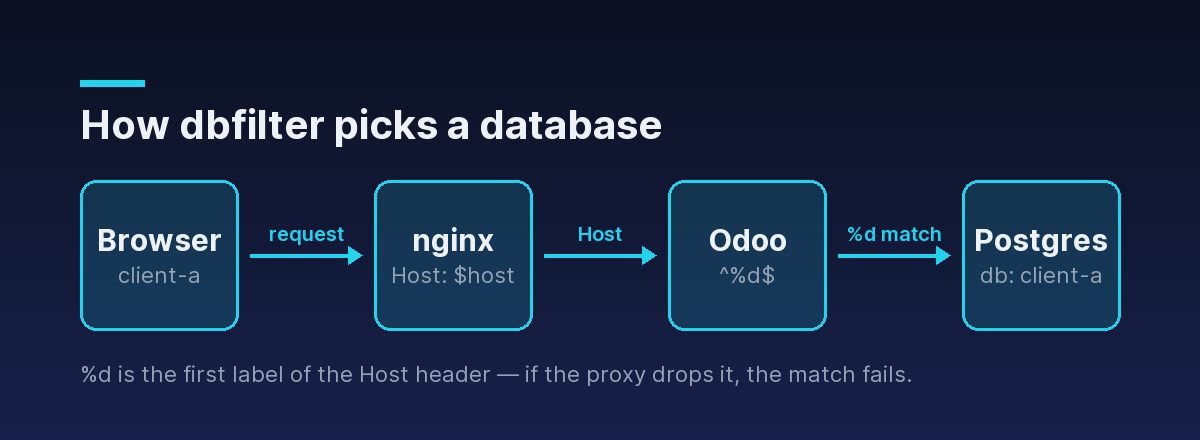
%h and %d are derived from the Host header of the HTTP request, not from DNS, not from the
URL your user typed, and not from anything Odoo knows about itself. Put nginx in front of Odoo without
being explicit about that header, and nginx forwards its own upstream name instead — Odoo sees a
Host of 127.0.0.1:8069, so %d becomes 127, matches no database, and every tenant gets the
selector or a "database not found" page.
There are two correct ways to fix it, and they correspond to the two ways Odoo can learn the real host.
Pass the original Host through:
location / {
    proxy_pass http://127.0.0.1:8069;
    proxy_set_header Host              $host;
    proxy_set_header X-Forwarded-Host  $host;
    proxy_set_header X-Forwarded-For   $proxy_add_x_forwarded_for;
    proxy_set_header X-Forwarded-Proto $scheme;
    proxy_redirect off;
}
Or let proxy_mode do it. With proxy_mode = True, Odoo runs behind Werkzeug's ProxyFix
middleware, which rewrites the request's host from X-Forwarded-Host. So a proxy that sets
X-Forwarded-Host correctly also fixes dbfilter matching — the two settings are coupled even though
nothing in their names suggests it.
In practice, set both headers and turn proxy_mode on. The full reasoning behind that flag, including
the security pitfall of trusting forwarded headers on a directly reachable Odoo, is in
the Odoo proxy_mode configuration guide, and the complete production
server block is in running Odoo behind an nginx reverse proxy.
Host header before you touch the regex. Nine times out of ten the pattern is correct and the header is wrong.Hiding the database manager
dbfilter decides which database is served. It does not, on its own, stop anyone from reaching
/web/database/manager and creating, duplicating, backing up, or dropping databases. On a
multi-tenant server that page is the whole ballgame, so close it:
[options]
dbfilter = ^%d$
list_db = False
admin_passwd = <a long random string, not "admin">
list_db = False disables the database-listing and management routes. Combined with a dbfilter that
resolves to exactly one database per host, there is no selector to show and no manager to reach.
The corresponding command-line flags exist for ephemeral containers and quick tests:
odoo-bin --db-filter='^%d$' --no-database-list -c /etc/odoo/odoo.conflist_db = False, an ambiguous or non-matching dbfilter no longer degrades into a selector — it becomes an error page, because Odoo has no way to ask the user. Verify each hostname resolves to exactly one database before you disable the list, not after.A working multi-tenant configuration
Putting the pieces together for an agency hosting several client databases on one Odoo server, with
databases named client-a, client-b, and client-c:
[options]
; Each subdomain maps to exactly the database of the same name
dbfilter = ^%d$
; No database manager, no database list, ever
list_db = False
admin_passwd = <long random string>
; Trust the reverse proxy's forwarded headers
proxy_mode = True
; ...and make sure Odoo is only reachable through that proxy
http_interface = 127.0.0.1
The Docker equivalent mounts the same file rather than reinventing the settings as environment variables:
services:
  odoo:
    image: odoo:18
    volumes:
      - ./config/odoo.conf:/etc/odoo/odoo.conf:ro
    expose:
      - "8069"
  proxy:
    image: nginx:stable
    ports:
      - "443:443"
    volumes:
      - ./nginx/odoo.conf:/etc/nginx/conf.d/default.conf:ro
    depends_on:
      - odoo
Note that Odoo is behind expose, not ports — the container is reachable from nginx and nothing
else. That matters here for the same reason it matters for proxy_mode: settings that trust the
incoming request are only safe when the only thing that can send a request is your proxy.
Verify the result per host, rather than trusting the config file:
# Should return the login page for client-a, not a database selector
curl -sI -H "Host: client-a.example.com" https://client-a.example.com/web/login

# Should 404 or redirect — never render the manager
curl -sI https://client-a.example.com/web/database/manager
dbfilter and the External API
Everything above governs browser traffic, where the database has to be inferred from a hostname because there is nowhere else to put it. Programmatic traffic works differently, and conflating the two causes real confusion.
When you call Odoo's External API, the database is an explicit parameter of the call, not
something derived from the Host header. Through ODXProxy, it lives in the per-request
odoo_instance object alongside the target URL, the user id, and that user's API key:
{
  "id": "01J9Z8K3QJ7Y5T2N6V4W8X0ABC",
  "action": "search_read",
  "model_id": "res.partner",
  "params": [[["is_company", "=", true]]],
  "keyword": { "fields": ["name", "email"], "limit": 20 },
  "odoo_instance": {
    "url": "https://client-a.example.com",
    "db": "client-a",
    "user_id": 2,
    "api_key": "<the Odoo user's API key>"
  }
}
Two consequences follow, and both are practical.
First: a hostname-based dbfilter is not an access-control boundary for API traffic. It shapes
which database a web request resolves to. Treat database-level isolation for machine traffic as a
credentials problem — separate Odoo users and API keys per database — not something the filter is
enforcing for you.
Second: a wrong db fails as an Odoo error, not a transport error. The proxy reaches Odoo
perfectly well; Odoo just cannot open the database you named. That comes back as HTTP 200 with a
populated error object, because only proxy-layer failures use a non-200 status:
{
  "jsonrpc": "2.0",
  "id": "01J9Z8K3QJ7Y5T2N6V4W8X0ABC",
  "error": {
    "code": 200,
    "message": "Odoo Server Error",
    "data": {
      "name": "psycopg2.OperationalError",
      "message": "database \"client_a\" does not exist"
    }
  }
}error field before reading result. A typo'd db — an underscore where the name has a hyphen — returns a 200 that a naive client happily treats as success and reads as an empty result. The reusable two-step handler is in the Odoo API error handling guide.Because the target instance travels in the request body, one proxy deployment fronts every tenant
database without a per-tenant upstream block: the same client code points at client-a or client-b
by changing db, while the proxy URL and its x-api-key stay the same. That routing model is covered
in why and how to put an API gateway in front of Odoo.
Troubleshooting
| Symptom | Likely cause | Fix |
|---|---|---|
| Database selector appears for every host | Host header not forwarded; %d resolves to the upstream address | proxy_set_header Host $host and/or proxy_mode = True |
| Selector appears for one tenant only | Backup/staging database also matches | Anchor the pattern: ^%d$, and rename client-a-backup out of the way |
"Database not found" after enabling list_db = False | Filter matches zero databases | Test the regex against the real database names before disabling the list |
| Wrong tenant's data after login | Filter matched a different database than intended; stale session cookie | Fix the pattern, then clear the session cookie for that host |
Works on example.com, fails on www.example.com | %d derivation and the www. prefix | Match on %h, or redirect www. to the apex at the proxy |
| API calls fail while the web UI works | The API names its own db; the filter is irrelevant | Check odoo_instance.db matches the real database name exactly |
Checklist
- Name databases after the subdomain that serves them, then use
dbfilter = ^%d$. - Anchor both ends of the pattern so backups and staging copies can't match.
- Forward the real
Host(andX-Forwarded-Host) from the reverse proxy, withproxy_mode = True. - Set
list_db = Falseand a strongadmin_passwd— but only after verifying the filter. - Bind Odoo so it is reachable only through the proxy.
- Remember the API selects its database by parameter, not by hostname.
Get those right and one Odoo server hosts many databases with no selector, no cross-tenant leakage,
and no per-tenant configuration to maintain. For the programmatic side of a multi-database
deployment, the API reference documents the full request shape, and the
Python SDK binds a database once so db isn't a per-call argument you can typo.